TP-Link EAP615-Wall

$60.00

TP-Link EAP615-Wall

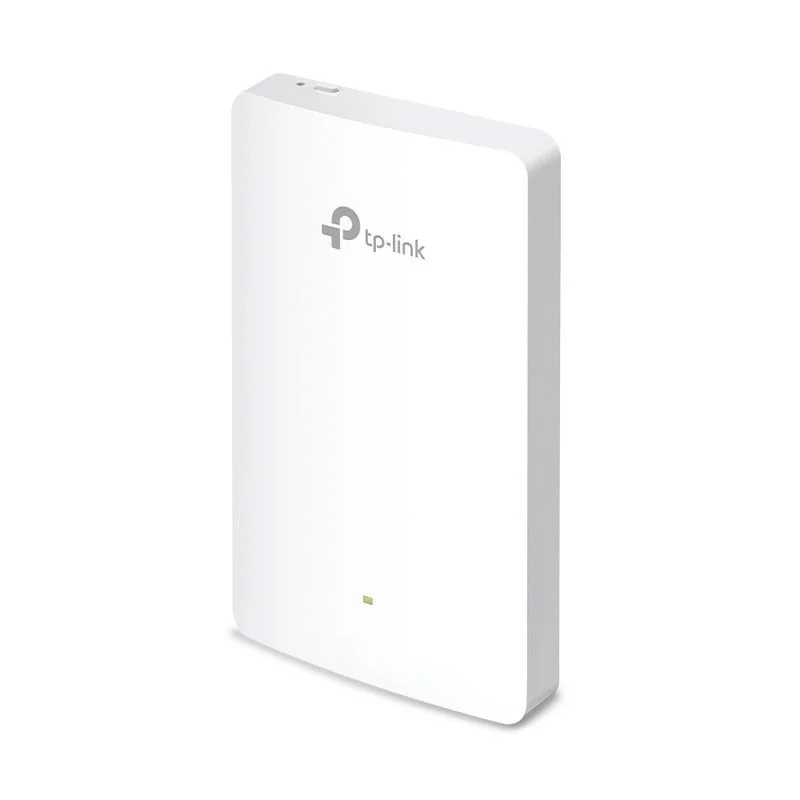
Overview The TP-Link EAP615-Wall is a Wi-Fi 6 (802.11ax) wallplate access point designed for hospitality, multi-dwelling units, offices and other environments where in-room coverage and a clean, professional appearance are required. It provides dual-band wireless, PoE power over Ethernet, and centralized management compatibility with TP-Link Omada Controller for simplified deployment and monitoring.

Key features

  • Wi-Fi standard: IEEE 802.11ax (Wi-Fi 6) for improved capacity, efficiency, and performance compared with Wi-Fi 5.

  • Dual-band: Simultaneous 2.4 GHz and 5 GHz operation.

  • Maximum data rates: Combined multi-gigabit throughput (actual rate depends on environment and client capabilities).

  • Antennas: Integrated internal antennas optimized for in-room coverage.

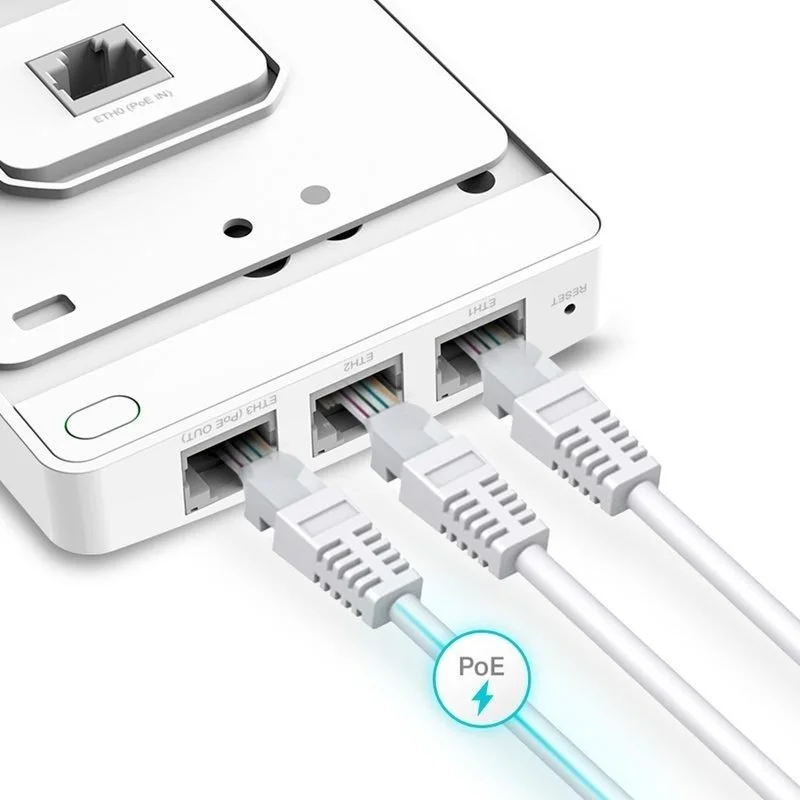
  • Ports: 1 Gigabit Ethernet LAN port for uplink (supports PoE input) and 1 Gigabit Ethernet pass-through port to provide wired connectivity in the room.

  • Power over Ethernet: Supports 802.3af/at PoE for flexible installation without an AC outlet.

  • Mounting: Standard single-gang wallplate form factor for flush installation in guest rooms or offices.

  • Management: Compatible with TP-Link Omada Controller (software/hardware/cloud options) for centralized provisioning, monitoring, and firmware updates. Also supports standalone mode for small deployments.

  • Security: WPA3 and WPA2 encryption support, guest network capabilities, VLAN tagging and captive portal options (when used with Omada Controller).

  • QoS and traffic control: Band steering, airtime fairness, and basic QoS to prioritize client traffic.

  • Multiple SSIDs: Supports multiple SSIDs per radio to separate guest and private networks.

  • Power and energy: Efficient power usage and heat dissipation designed for wall-mount operation.

Use cases

  • Hotels and hospitality: Provide in-room wireless and wired connectivity while maintaining a neat, tamper-resistant installation.

  • Multi-dwelling units (apartments, condos): Deliver per-unit Wi-Fi coverage with centralized management and per-unit network segmentation.

  • Offices and work-from-home rooms: Offer reliable in-room coverage and a wired port for desktop devices or VoIP phones.

  • Classrooms and dormitories: Manage many individual client environments with centralized policies and captive portal authentication.

Installation and deployment notes

  • Mounting: Install into a standard single-gang electrical box. Ensure the box depth and cable routing accommodate the EAP615-Wall’s chassis.

  • Power: Requires PoE input (802.3af/at). Confirm compatible PoE switch or injector and verify budget per-port power.

  • Cabling: Use Cat5e or better Ethernet cabling to support Gigabit performance and PoE.

  • Placement: Install in the room where client devices will primarily be used; avoid placement behind large metal objects or inside cabinets that block RF.

  • Channel planning: In high-density deployments, use the Omada Controller to automate channel and power settings; consider manual planning for complex environments.

  • Security: Configure WPA3 where supported by clients, enable strong passphrases, and use guest network isolation for public SSIDs

TP-Link EAP615-Wall

Overview The TP-Link EAP615-Wall is a Wi-Fi 6 (802.11ax) wallplate access point designed for hospitality, multi-dwelling units, offices and other environments where in-room coverage and a clean, professional appearance are required. It provides dual-band wireless, PoE power over Ethernet, and centralized management compatibility with TP-Link Omada Controller for simplified deployment and monitoring.

Key features

  • Wi-Fi standard: IEEE 802.11ax (Wi-Fi 6) for improved capacity, efficiency, and performance compared with Wi-Fi 5.

  • Dual-band: Simultaneous 2.4 GHz and 5 GHz operation.

  • Maximum data rates: Combined multi-gigabit throughput (actual rate depends on environment and client capabilities).

  • Antennas: Integrated internal antennas optimized for in-room coverage.

  • Ports: 1 Gigabit Ethernet LAN port for uplink (supports PoE input) and 1 Gigabit Ethernet pass-through port to provide wired connectivity in the room.

  • Power over Ethernet: Supports 802.3af/at PoE for flexible installation without an AC outlet.

  • Mounting: Standard single-gang wallplate form factor for flush installation in guest rooms or offices.

  • Management: Compatible with TP-Link Omada Controller (software/hardware/cloud options) for centralized provisioning, monitoring, and firmware updates. Also supports standalone mode for small deployments.

  • Security: WPA3 and WPA2 encryption support, guest network capabilities, VLAN tagging and captive portal options (when used with Omada Controller).

  • QoS and traffic control: Band steering, airtime fairness, and basic QoS to prioritize client traffic.

  • Multiple SSIDs: Supports multiple SSIDs per radio to separate guest and private networks.

  • Power and energy: Efficient power usage and heat dissipation designed for wall-mount operation.
Use cases

  • Hotels and hospitality: Provide in-room wireless and wired connectivity while maintaining a neat, tamper-resistant installation.

  • Multi-dwelling units (apartments, condos): Deliver per-unit Wi-Fi coverage with centralized management and per-unit network segmentation.

  • Offices and work-from-home rooms: Offer reliable in-room coverage and a wired port for desktop devices or VoIP phones.

  • Classrooms and dormitories: Manage many individual client environments with centralized policies and captive portal authentication.

Installation and deployment notes

  • Mounting: Install into a standard single-gang electrical box. Ensure the box depth and cable routing accommodate the EAP615-Wall’s chassis.

  • Power: Requires PoE input (802.3af/at). Confirm compatible PoE switch or injector and verify budget per-port power.

  • Cabling: Use Cat5e or better Ethernet cabling to support Gigabit performance and PoE.

  • Placement: Install in the room where client devices will primarily be used; avoid placement behind large metal objects or inside cabinets that block RF.

  • Channel planning: In high-density deployments, use the Omada Controller to automate channel and power settings; consider manual planning for complex environments.

  • Security: Configure WPA3 where supported by clients, enable strong passphrases, and use guest network isolation for public SSIDs